Key takeaways
- An AI agent plans and prepares multi-step work on your own data, such as a prospect brief or a lapse-risk list, then hands it to a person to approve.
- Agents differ from chatbots and LLMs: they work across steps and can act in your systems, so permissions and approval rules matter as much as the model.
- The strongest early uses sit in fundraising: qualifying prospects, preparing major gift meetings, and spotting donors who need attention before they lapse.
- Keep people in charge. Outreach should wait for a person, and record changes should follow approval rules your team controls.
- Start with one use case, clean data, and a written AI policy, then measure the hours the agent gives back.
Most nonprofit teams already use AI to draft an appeal or summarize a report. AI agents go a step further. Instead of answering one prompt, an agent takes a goal, reads the records it needs, works through several steps, and prepares a finished piece of work for someone on your team to review. That makes agents a capacity question, not a novelty: the right agent gives a stretched development team back the hours it spends assembling research and lists.
This guide covers:
- What AI agents are, and how they differ from chatbots and LLMs
- How nonprofit teams use AI agents today
- An example from a food bank’s fall campaign
- How to keep people in charge of AI agents
- Where to begin
What are AI agents?
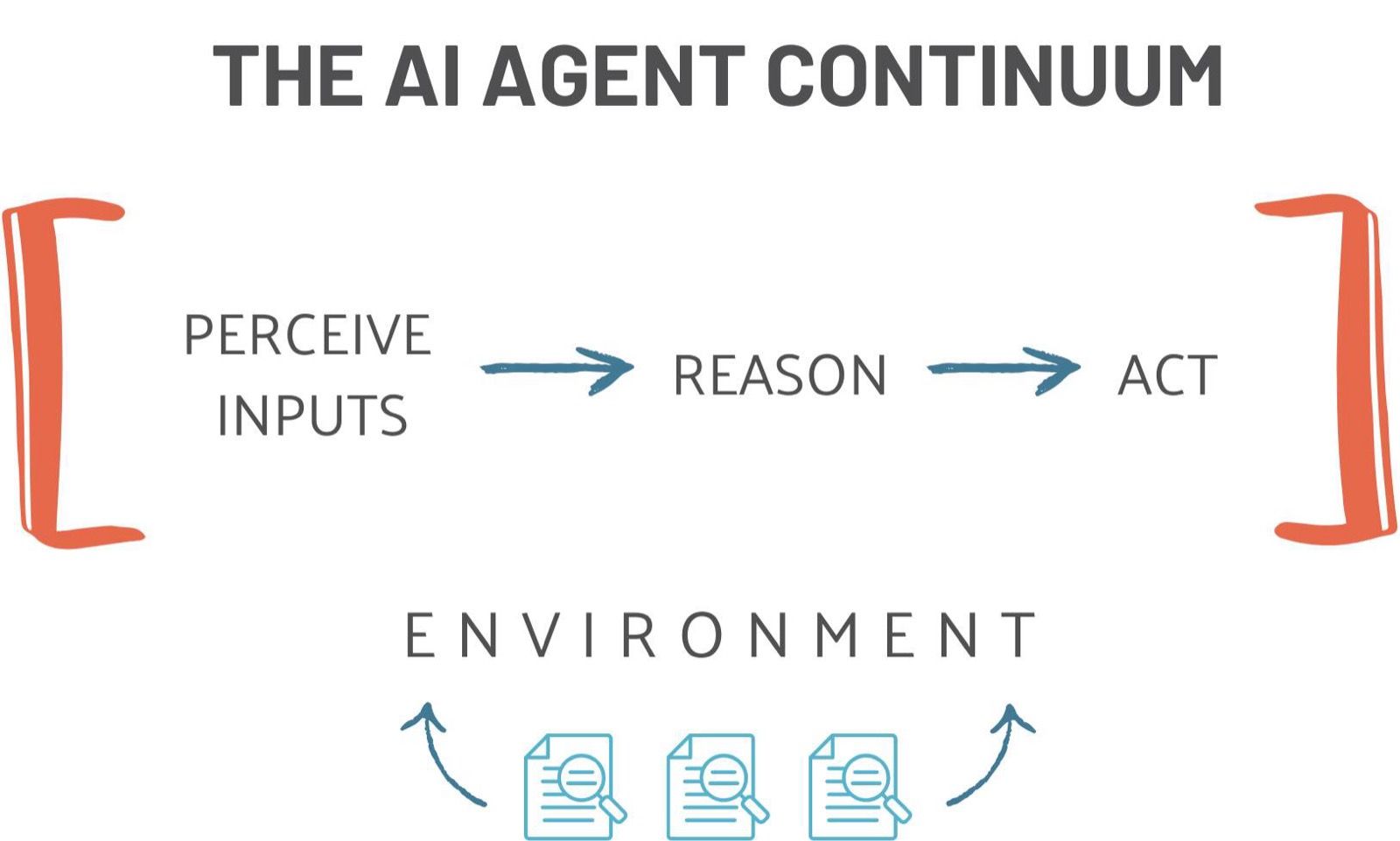
An AI agent is software that uses a large language model (LLM) to pursue a goal across several steps. It takes in information, reasons about what to do next, and acts: it runs a query, reads a record, drafts a document, or proposes an update. Think of it as a digital teammate built for one job, such as preparing a donor meeting brief, that works in the background while your staff focus on relationships.
What makes an agent useful is context. A general AI assistant knows what it was trained on. An agent inside your CRM works from your constituent records, your giving history, and your campaign results, and it can only do what its permissions allow.
AI agents vs. chatbots vs. LLMs
The three terms get used interchangeably, but they are different tools.
| AI agent | Chatbot | LLM | |
|---|---|---|---|
| What it is | Software that uses an LLM to plan and prepare work across several steps | An app built to hold a conversation | The core AI model, trained on a fixed dataset |
| What it draws on | The LLM plus your records, memory, and tools | A script or knowledge base set up in advance, sometimes an LLM | Its training data |
| Works across steps | Yes | No | No |
| Acts in your systems | Yes, within the permissions you set | Rarely | No |
| Your team’s role | Sets the goal and approves what goes out | Asks each question | Writes each prompt |
An example makes the difference concrete. Ask an LLM “What is donor stewardship?” and it answers from its training data. Ask a chatbot in your CRM “How do I set up a stewardship automation?” and it returns the steps it was given. Ask an agent “Who gave once this year but not again, and how should we re-engage them?” and it queries your records, reasons over the results, and proposes a next step for you to approve.
How nonprofit teams use AI agents
The best early uses are jobs that eat staff time but follow a clear pattern. In StratusLIVE Ignite, AI agents are included in every subscription, and each one is built for a specific job:
- Prospect research. The Prospect Research agent qualifies a prospect across capacity, affinity, propensity, and linkage, and delivers a brief with its sources shown.
- Major gifts. The Major Gift agent prepares donor meeting briefs, ask strategies, and 90-day cultivation plans for the officers carrying the portfolio.
- Annual giving and retention. The Retention agent ranks which donors need attention before they lapse and recommends the recovery move.
- Answers for staff. The Constituent Support agent answers questions about constituents and campaign results in plain language, with the date range and filters spelled out.
The roster also includes the Donor Enrichment agent, which pulls in integrated wealth screening for a quick profile before a call, and the Data Import agent, which maps and validates a file, then writes only what you confirm. You can see every agent on the Ignite AI agents page.
An example: a food bank’s fall upgrade campaign
Imagine a regional food bank preparing a fall campaign, with a goal of moving mid-level donors, those giving between $250 and just under $1,000 a year, into recurring gifts or major gift cultivation. Here is how agents share the work so staff time goes to donors:
- The Retention agent ranks the mid-level donors most at risk of lapsing and recommends who to contact first.
- The Prospect Research agent qualifies the donors whose history suggests a larger gift, with the evidence for each.
- The Major Gift agent prepares the meeting brief and ask strategy for each officer visit.
- The Constituent Support agent answers the campaign lead’s questions, such as how last fall’s appeal performed, without a report request.
At every step, a person decides. The development director approves the outreach list, the officers own the conversations, and nothing sends until someone on the team approves it.
How to keep people in charge of AI agents
AI agents raise a fair question for any nonprofit leader: who is accountable for what the agent does? The answer should be your team, by design. Look for four things before you let an agent near donor data:
- Approval before anything sends. Drafts and outreach wait for a person, and record changes follow approval rules your team sets. In Ignite, nothing sends until you approve it, and writes go through approval gates your team configures.
- Defined permissions. Each agent should act only within the permissions it is given. Some Ignite agents, like Constituent Support and Donor Enrichment, are read-only by default: they read and cite your data.
- Sources you can check. An agent’s work should show where it came from, so a gift officer can verify a brief before walking into a meeting.
- A written policy. Decide which tasks agents may help with, what data they may use, and who approves their work. In the M+R Benchmarks 2026 study, 69% of participating nonprofits report having policies, procedures, or guidelines for generative AI, up from 42% in 2024. If you do not have one yet, start with our AI policy template.
For how Ignite governs agent work in detail, see governed AI.
Where to begin with AI agents
Start with one challenge, not a platform-wide rollout. Pick a job your team is short-handed on, such as prospect research before a campaign or follow-up with lapsing donors, and answer three questions:
- Is the data ready? An agent is only as useful as the records it can read, so check that the data it needs is clean and in one place.
- Who approves its work? Build review into the workflow, so drafts do not pile up waiting for a person.
- How will you measure it? Count the hours the agent gives back, and decide in advance what your team will do with them.
If your current tools include pre-built agents, start there. If they do not, it is worth asking why your donor data and your AI live in different places. See how AI agents work inside Ignite, or book a working session to watch them run on a scenario from your organization.
Frequently asked questions
What is the best AI agent for nonprofit teams?
The best one is the agent built for the job your team is short on, working on your own data. A major gifts team gets more from an agent that drafts meeting briefs than from a general chatbot. Look for agents that work inside your CRM, show their sources, and wait for a person before anything sends. Ignite includes agents for prospect research, major gifts, retention, and staff questions in every subscription.
Is there a ChatGPT for nonprofits?
General assistants like ChatGPT, Claude, and Gemini work well for drafting and research. The difference with an AI agent in your CRM is context: it reads your constituent records, prepares work on them, and follows the approval rules your team sets. Use general assistants for general writing, and keep donor data inside governed systems.
How is AI used in nonprofits?
Most nonprofits start with writing help: appeals, thank-you letters, and summaries. The next step is AI agents that prepare work on your own data, such as qualifying prospects, drafting meeting briefs, flagging donors at risk of lapsing, and answering staff questions about campaign results. The common thread is capacity. The team keeps the relationships and the decisions, and the AI prepares the work.
Are AI agents safe to use with donor data?
They can be, when the platform is built for it. Look for agents that work inside your system under your organization's permissions, act only within defined scopes, hold anything that sends for a person to approve, and route record changes through approval rules your team sets. In Ignite, nothing sends until you approve it, and writes go through approval gates your team configures.